
Safeguarding the Airspace: Crucial Cybersecurity for the Distant Labor Force
Remote work is here to stay. But that flexibility comes with a real cost if security doesn't keep pace: breaches involving a remote-work factor now cost organizations an average of $1.07 million more than breaches without one, and 52% of security incidents in 2025 involved a remote worker's device or connection. Phishing alone accounts for 43% of initial breach attempts in remote environments.
Don't panic, business leaders — none of this means remote work is inherently unsafe. It means the old office-network security model doesn't automatically transfer to a distributed team, and a handful of deliberate practices can close most of the gap.
Building a Culture of Awareness
Education is power, especially against threats that specifically target human judgment rather than technical flaws. Train employees to recognize phishing attempts, avoid suspicious links, and use strong, unique passwords. Quarterly security training has been shown to cut phishing click rates by roughly 65% — a meaningful improvement over a single annual session that's forgotten by month three. Gamified or interactive training platforms tend to keep this material engaging rather than feeling like a compliance chore.
Open communication matters just as much as the training itself. Create a culture where employees feel safe flagging a suspicious email or asking "is this real?" without fear of looking foolish. The earlier a potential threat gets reported, the smaller the blast radius if it turns out to be real.
Securing the Remote Endpoint
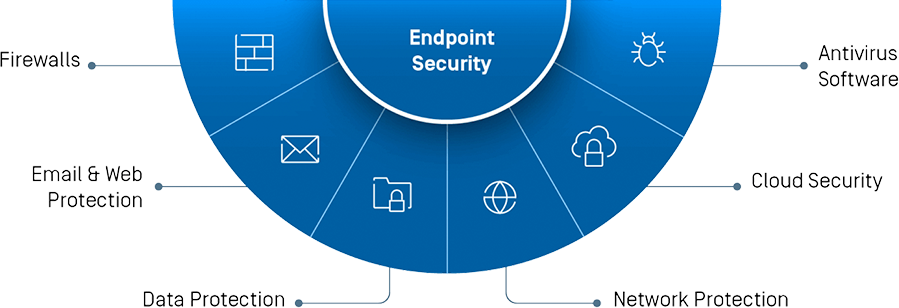
- Device management. Use Mobile Device Management (MDM) for any employee-owned devices accessing company systems, or standardize on company-issued hardware. MDM enables centralized security policies and encryption without relying on individual employees to configure things correctly on their own.
- Software updates. Outdated software is exploited software. Keep operating systems, firmware, and applications updated across every device — enabling automatic updates removes the dependency on employees remembering to do it manually, which matters given that unpatched personal devices account for roughly 22% of exploited endpoint weaknesses.
- Network security. Require employees to use a VPN whenever connecting from public or untrusted Wi-Fi, encrypting their traffic and masking their IP address. This matters more than it might seem — nearly 29% of remote workers admit to using public Wi-Fi for work without a VPN at least once a month.
Access Control and Data Protection
- Data minimization. Limit remote access to sensitive data using a strict need-to-know principle. An employee who doesn't need access to a system shouldn't have standing access to it "just in case."
- Data encryption. Encrypt sensitive information both in transit (moving across networks) and at rest (stored on devices). If a breach does occur, encryption is often the difference between a serious incident and a catastrophic one.
- Access controls, including MFA. Passwords alone aren't enough. Organizations that mandate multi-factor authentication (MFA) for all remote access see 86% fewer credential-based breaches — one of the highest-impact, lowest-cost security investments available today.
Specific Threats Remote Workers Actually Face
It helps to name the threats plainly, rather than talking about "cyber risk" in the abstract:
- Phishing emails remain the single most common entry point, responsible for roughly 43% of initial breaches in remote environments. Modern phishing is also harder to spot than it used to be — AI-generated phishing messages now arrive free of the spelling errors and awkward phrasing that used to be reliable red flags, and they're often personalized using information scraped from professional profiles.
- Malicious websites and drive-by downloads, which can install malware simply by visiting a compromised page — no attachment or click required.
- Misconfigured VPNs and remote access tools, responsible for around 14% of data leaks in remote work environments — a reminder that a VPN itself isn't automatically secure if it's poorly configured or missing MFA.
- Cloud and SaaS misconfigurations, which accounted for roughly 17% of remote-work security incidents — a growing risk as more company data lives in cloud platforms rather than on local servers.
Each of the measures above maps directly to one of these threats: MFA and awareness training blunt phishing, VPNs and network segmentation address unsecured connections, and encryption limits the damage even if an endpoint is compromised.
A Real Example of What Happens Without These Basics
In February 2024, the ransomware group ALPHV/BlackCat breached Change Healthcare — the largest healthcare claims-clearing intermediary in the U.S. — by using compromised credentials to remotely access a Citrix portal that did not have multi-factor authentication enabled. The attackers moved laterally inside the network for nine days before deploying ransomware, ultimately affecting roughly 190 million individuals and disrupting healthcare billing and operations nationwide.
The failure wasn't exotic. It was a single missing control — MFA on a remote access point — that's inexpensive and straightforward to implement. It's a stark illustration of how one overlooked basic can cascade into one of the largest breaches in history.
Your Takeaway Action List
If you implement nothing else from this guide, prioritize these:
- Enable MFA on every remote access point — VPNs, cloud logins, admin portals, all of it
- Require a VPN for any connection over public or untrusted Wi-Fi
- Set devices to update automatically rather than relying on manual patching
- Run quarterly (not annual) phishing awareness training
- Apply the need-to-know principle to sensitive data access
- Encrypt data both in transit and at rest
- Create a genuinely blame-free reporting culture for suspicious activity
Take 5 for Security: Schedule a five-minute weekly team check-in to share cybersecurity reminders, flag anything unusual, and keep security top-of-mind without turning it into a burdensome meeting.
Security Is a Continuous Effort
Cybersecurity for a distributed workforce isn't a project with a finish line — it's an ongoing practice. Regular security audits, refresher training, and staying current on emerging threats (including AI-driven phishing and deepfake-based social engineering) are what keep a remote team genuinely protected rather than protected on paper. Prioritize these fundamentals, and you can embrace the flexibility of remote work without treating security as an afterthought.
Bonus tip: Consider offering employees a stipend toward home network security — a decent firewall, antivirus software, or a properly configured router. It's a small cost that meaningfully closes the gap between "company laptop" and "everything else on that employee's home network."
Now go build a remote team that's both flexible and genuinely secure.
Frequently Asked Questions
What is the biggest cybersecurity risk for remote workers? Phishing remains the dominant threat, responsible for roughly 43% of initial breach attempts in remote work environments — and it's becoming harder to detect as AI-generated phishing messages lose the telltale errors that used to make them easy to spot.
Is a VPN enough to secure remote work? A VPN helps encrypt traffic on untrusted networks, but it isn't a complete solution on its own. It needs to be paired with MFA, since a misconfigured or unprotected remote access point — even with a VPN in place — can still be breached, as seen in the Change Healthcare incident.
How much does MFA actually reduce breach risk? Organizations that mandate MFA for all remote access have reported roughly 86% fewer credential-based breaches, making it one of the highest-impact security investments available.
How often should remote employees receive security training? Quarterly training has been shown to meaningfully outperform annual sessions, reducing phishing click rates by around 65% compared to infrequent, one-off training.
Should companies help pay for employees' home network security? It's a reasonable investment. A stipend toward a decent router, firewall, or antivirus software can close meaningful gaps in a distributed workforce's overall security posture at relatively low cost.